Your previous sets, beside the ones you’re logging
The useful question between sets is often simple: what weight and reps did I record last time? Flame puts that reference in the active workout, next to the current set fields.
Read the reference and the current entry separately
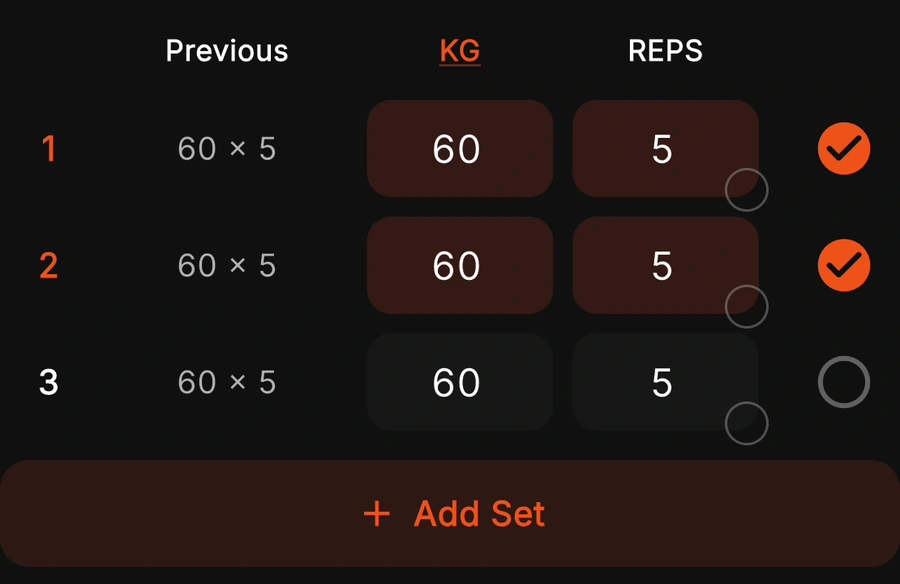
Start a workout, add or open the exercise, and compare the Previous column with the weight and reps you enter now. Mark a set complete after recording what you performed, then finish the workout so it becomes completed history.
For example, if the previous row says 60 × 5 and you record 60 × 6 today, keep both meanings intact: last time was five reps; today’s completed entry is six. The history reference is not a load recommendation or proof that you should increase weight.
What “previous” means in the reviewed version
| Situation | Expected reference |
|---|---|
| Same exercise in a different routine | The most recent qualifying completed workout can supply the reference. The lookup is by exercise, not by routine. |
| Warm-up sets last time | Warm-ups are excluded from previous normal working-set history. |
| Unfinished workout or set | It is excluded from the qualifying previous-set lookup. |
| More working sets today | A row beyond the previous set count has no matching reference. |
| Display unit changed | The previous stored load is converted to your current display unit. |
| RIR recorded previously | The previous row can also show the logged reps in reserve. |
Rows are matched in working-set order. Adding a warm-up above working set one does not shift working set one’s reference. That does not make unlike sets comparable: if you change the exercise setup or the purpose of the sets, review the older workout before interpreting the numbers.
If the reference is missing or surprising
- First time logging an exercise: there may be no qualifying completed history yet.
- A similar exercise has history: verify the exercise entry. Different exercise identifiers do not share a previous-set record just because the names look similar.
- A different routine supplied the reference: this is consistent with the current exercise-wide lookup. Heavy and light days using the same exercise can refer to one another.
- A newer session is absent: check whether the workout and its relevant normal sets were completed.
Flame’s reviewed lookup does not offer a same-routine filter in this path. If you need separate history contexts for the same lift on different training days, consider that limitation before switching apps. Hevy documents a choice of history scopes.
Try the same comparison without an app
Take a recent exercise from your notes and copy its completed sets into the previous side of the workout log. Enter this session on the other side. Keep exercise, units and load convention consistent. You can then inspect recorded volume or read the progress-metrics guide to understand what changed.
Flame stores its workout database on the device. That is not a promise of cross-device cloud restoration, and it does not mean the app has no analytics. Review the privacy policy and preserve important records before clearing app data or changing devices.