Workout app or spreadsheet?
Compare how you enter sets, find previous sessions and keep a copy. Start with the same record in both formats.
On this page
Compare the same session
Comparing a feature list does not tell you how a tracker fits into a workout. Start with one exercise and a small, familiar record. Enter the completed sets, find the earlier session, make one correction and check how you would keep a copy.
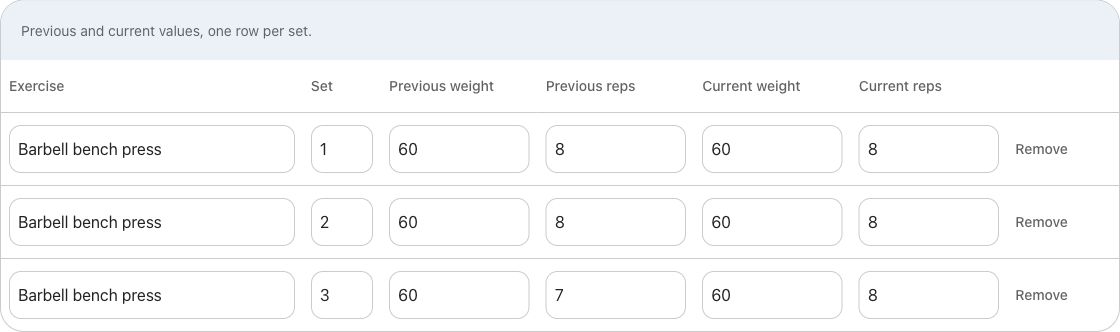
We provide a three-set example CSV so the numbers stay fixed. It contains previous sets of 60 kg × 8, 8 and 7 reps, and current sets of 60 kg × 8, 8 and 8. Use the file to compare record formats; the app workflow is based on source review.
Open the file and inspect its headers and three rows. Our browser log uses the same columns. The file is a worksheet, not a Flame import.
Choose what you manage yourself
| Task | Spreadsheet | Flame context |
|---|---|---|
| Record sets | You choose columns, row order and validation. | Weight and reps sit beside a Previous reference. |
| Find earlier results | Maintain dates and filters or a consistent sheet structure. | The reviewed lookup selects eligible sets from the latest matching exercise workout. |
| Calculate volume | Write and maintain a formula using your inclusion rule. | Saved app totals have their own set and dumbbell conventions. |
| Keep a portable copy | Save the actual file and check it opens elsewhere. | Do not assume a local app database is an export or cloud backup. |
| Move data between tools | CSV columns still need mapping and validation. | This site does not establish a verified CSV importer into Flame. |
Choose a sheet if you want to control the formulas and layout. Choose a tracker if you want your reference beside the active set.
Check the arithmetic before comparing totals
In the example file, multiply Current weight by Current reps for each row, then sum the products: 480 + 480 + 480 = 1,440 kg·reps. The previous columns give 480 + 480 + 420 = 1,380 kg·reps. A difference of one rep accounts for the 60 kg·reps change.
Formula notation depends on your spreadsheet program and locale, so verify the result rather than pasting a formula you do not understand. Do not include the previous columns in the current-session sum. Preserve units in the file rather than relying on a remembered setting.
Adding a warm-up, doubling per-hand dumbbell loads, or entering pounds as kilograms can change the total without changing the underlying workout. Reconcile the rules with the volume calculator. A correct spreadsheet total need not match an app total when the included sets differ.
Find your history later
Ask whether you can find the same exercise after a routine change. In the reviewed Flame behavior, Previous is exercise-wide across completed workouts rather than restricted to the current routine. A spreadsheet can reproduce different scopes if you build and maintain that filtering yourself.
Also consider corrections. If you rename an exercise, change its variation or alter your dumbbell convention halfway through a history, the label alone may no longer identify comparable sets. Keep the original context instead of quietly making old rows look uniform.
Compare the documented workflows in Flame vs Strong and Flame vs Hevy.
Keep the choice reversible
Before committing your only copy to a new workflow, save the original file or use the current app’s documented export. Open the copy and inspect dates, units, exercise names and several individual sets. A file existing on your device does not prove that another app can reconstruct it.
A hybrid approach is also possible: keep a tracker for active logging and a separate file for analysis when the app supports the export you need. Do not assume every app supports that path. Our browser tool exports a simple sheet, and its entries disappear on reload; it does not synchronize with the Flame app.
Choose the workflow that makes those responsibilities manageable for you. Use the worked logging guide to start, or the migration checklist before moving an existing history.
Sources & review
Examples are illustrative. Flame behavior follows the source review in our product guides. Comparisons use official documentation; current competitor builds were not tested.